How to Copy Text from a Scanned PDF
A scan holds pixels, not characters — that is why nothing selects. OCR rebuilds the words, and hands you both a searchable PDF and a plain-text file.
Read the guideMake scanned PDFs searchable and copyable — text recognition runs entirely in your browser.
Drop your scanned PDF here or click to select
One fictional page. Indonesian will be selected automatically.
Drop in the scan you want to make searchable, or click to browse.
English, Indonesian, or both at once for mixed-language documents.
The searchable PDF downloads automatically — grab the plain text too.
Text recognition runs in your browser. Contracts, invoices, and archives never touch our servers.
Your pages keep their original layout and size, with an invisible text layer added on top that you can search, select, and copy.
Besides the searchable PDF, download the recognized text as a .txt file for further editing.
Open the PDF and try to drag-select a line of text. If the words highlight, the file already carries a real text layer and OCR would only make it worse — you can copy from it as it is. If your cursor draws a rectangle across the page instead, the page is a picture of text and OCR is exactly what it needs.
Some PDFs are a mix: a digital document with a scanned receipt pasted in, for example. Enter just the scanned page numbers in the page selection field to avoid recognising the whole document. The output contains only those pages; use the Merge PDF tool if you need to combine them with other pages.
Recognition quality is decided almost entirely by the input, not by settings:
Handwriting is out of scope — the engine is trained on printed type, and cursive notes in a margin will not come through. Very small print and heavily stylised display fonts are similarly unreliable. Words the engine is not reasonably confident about are left out of the text layer rather than guessed at, which keeps the searchable text trustworthy at the cost of missing the occasional word.
The searchable PDF is rebuilt rather than edited in place: each page is rendered at up to twice its nominal size, stored as a JPEG, and given a transparent text layer positioned over the words the engine found. Page dimensions are preserved, so the document looks and prints the same and every viewer can search it — but because the page is re-encoded, this is not the tool to reach for if you need the original scan preserved untouched. Keep your original file if that matters.
Recognition is the slow part, and it runs on your own processor: expect a few seconds per page, longer on a phone. Once it finishes, the searchable PDF downloads on its own and a separate button offers the recognised words as a plain .txt file — the same text without any layout, which is the more convenient form to paste into a document or a spreadsheet.
This fictional document contains an image, with no selectable text. We processed it in PDFMatic with Indonesian selected. The text below is the unedited recognition output; punctuation and numbers still need checking in your own documents.
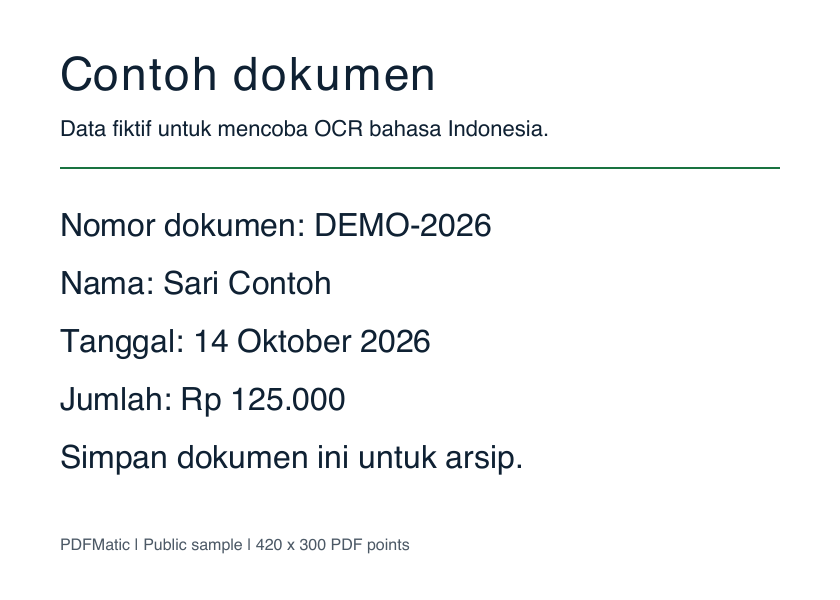
Contoh dokumen

Data fiktif untuk mencoba OCR bahasa Indonesia.
Nomor dokumen: DEMO-2026
Nama: Sari Contoh

Tanggal: 14 Oktober 2026
Jumlah: Rp 125.000

Simpan dokumen ini untuk arsip.
PDFMatic | Public sample | 420 x 300 PDF points
Download the sample scan · Download the extracted text
Example captured 2026-10-14. Printed text only; this sample does not measure handwriting or difficult scans.
Need to copy a paragraph into Word or Google Docs? Follow the scanned PDF text-copying guide. For searchable archives, see how the searchable text layer works.
A scan holds pixels, not characters — that is why nothing selects. OCR rebuilds the words, and hands you both a searchable PDF and a plain-text file.
Read the guideA scan is just a photo of a page — you cannot search or copy it. OCR fixes that by adding an invisible text layer. Here is how to do it privately.
Read the guideTwo kinds of "online" PDF tools exist, and they treat your files very differently. Learn how to tell them apart and when the difference matters.
Read the guideYes. Enter page numbers or ranges such as 1-3, 5 before starting; leave the field blank to process every page. The output contains only the selected pages. Use Cancel recognition to stop the current operation and return to the settings.
OCR (Optical Character Recognition) reads the text in your scanned pages and adds an invisible text layer on top of the original image. The page looks exactly the same, but you can now search the document, select text, and copy it into other apps.
Yes — your PDF is never uploaded. The recognition engine (Tesseract) runs as WebAssembly inside your browser, so contracts, medical records, and other sensitive scans never leave your device.
English and Indonesian, and you can select both at once for mixed-language documents. Each language model is downloaded to your browser once and reused afterwards.
Accuracy depends on scan quality. Clean, straight, 200+ DPI scans typically recognize very well; skewed pages, low-resolution photos, and handwriting are harder. For best results, scan documents flat and in good lighting.